


Recently, Meta released the Llama 3 and 3.1 families of models, including an 8B, 70B, and 405B parameter model. The 3.1 model natively supports tool calling, making it one of the best open-source large language models for agentic automation.
This article will discuss tool-calling in LLMs and how to use Groq’s Llama 3.1 tool-calling feature to build capable AI agents.
In this article, we cover
The basics of tool calling.
How to use Llama 3.1 on Groq Cloud for tool calling.
How to use Composio tools with LlamaIndex to build a research agent.
But before that, let’s understand what even tool calling is.
Note: We will use the terms tool calling and function calling interchangeably. As they more or less refer to the same concept.
What is Tool Calling?
Tools are functions that allow large language models (LLMs) to interact with external applications. They provide an interface for LLMs to access and retrieve information from outside sources.
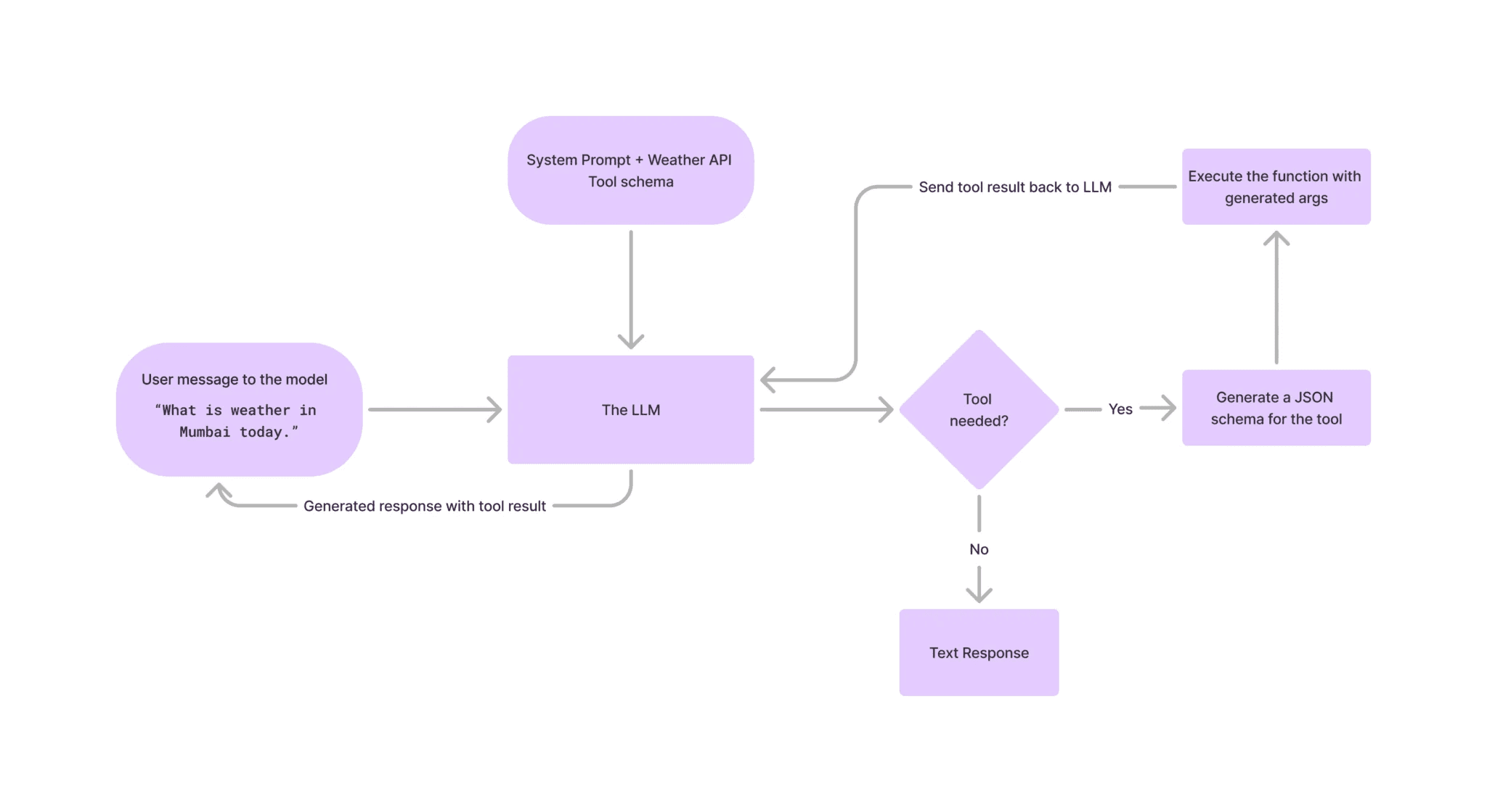
Despite the name, LLMs don't directly call tools themselves. Instead, when they determine that a request requires a tool, they generate a structured schema specifying the appropriate tool and the necessary parameters.
For instance, assume an LLM can access internet browsing tools that accept a text parameter. So, when a user asks it to fetch information about a recent event, the LLM, instead of generating texts, will now generate a JSON schema of the Internet tool, which you can call the function/tool.
Here is a schematic diagram that showcases how tool calling works.
What is Groq?
Groq is an AI inference provider that hosts open-source models such as Mistral, Gemma, Whisper, and Llama. They are the industry-leading platform for offering the fastest AI inference, which makes it ideal for building capable agentic systems.
This article will showcase how you can use the Groq cloud to build AI agents using Composio tools.
Create Groq API key
You will need an API key to use the LLMs hosted by Groq Cloud. So, go to Groq Cloud and create one.
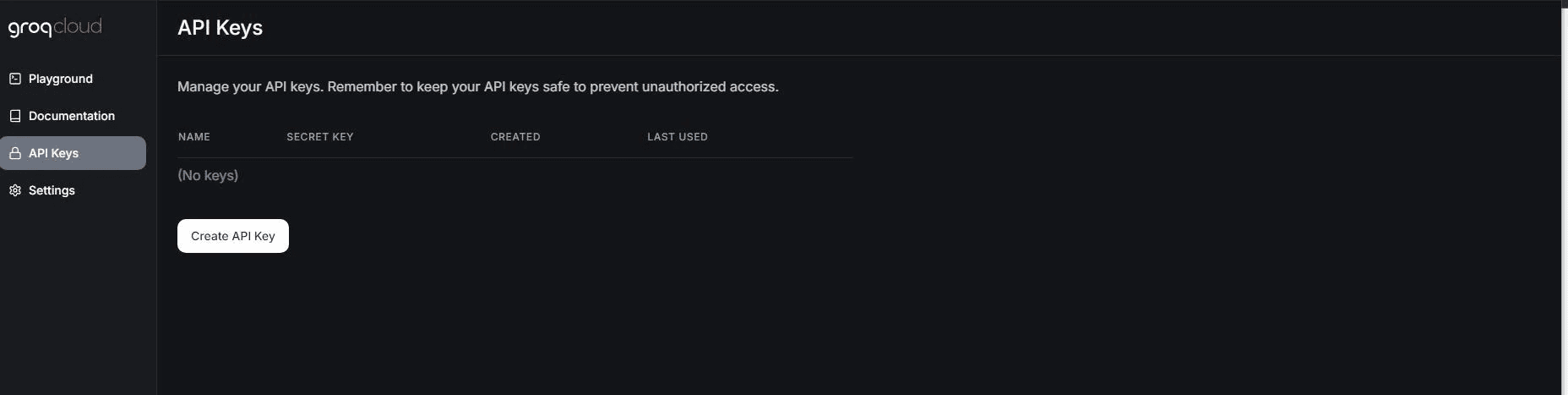
Copy the API key and save it somewhere secure.
Llama 3 Tool Calling in Groq
Let’s explore how to use a tool called Llama 3 Groq.
Begin by installing Groq. pip.
pip install groq
Set the Groq API key as an environment variable.
export GROQ_API_KEY="api key"
Now, create an instance of Groq with Llama 3.1 model.
from groq import Groq
import json
groq = Groq(api_key="groq_api_key")
client = groq
MODEL = "llama-3.1-70b-versatile" #'llama3-groq-70b-8192-tool-use-preview'
Groq also has a fine-tuned Llama 3 model ('llama3-groq-70b-8192-tool-use-preview') for tool-calling, which performs on par with GPT-4o with some trade-off with reasoning.
Next, define a simple Calculator function to demonstrate how the Llama 3 tool calling works.
def calculate(expression):
    """Evaluate a mathematical expression"""
    try:
        result = eval(expression)
        return json.dumps({"result": result})
    except:
        return json.dumps({"error": "Invalid expression"})
Create a schema for passing the function to the Llama 3 model.
tools = [
        {
            "type": "function",
            "function": {
                "name": "calculate",
                "description": "Evaluate a mathematical expression",
                "parameters": {
                    "type": "object",
                    "properties": {
                        "expression": {
                            "type": "string",
                            "description": "The mathematical expression to evaluate",
                        }
                    },
                    "required": ["expression"],
                },
            },
        }
    ]
In the above code block, the calculator tool is defined as a function within a structured schema to be passed to the Llama 3 model.
The tool is specified as a function with the name.
"calculate".The tool's purpose is to evaluate a mathematical expression.
The
"parameters"section outlines the expected input:It expects an object with a property called
"expression".The
"expression"parameter is of type string and represents the mathematical expression to be evaluated.
The
"required"array indicates that the"expression"parameter is mandatory for the tool to operate.
Now, let’s make an API call with a prompt and tool to the model.
user_prompt = "What is 25 * 4 + 10?"
messages=[
        {
            "role": "system",
            "content": "You are a calculator assistant. Use the calculate function to perform mathematical operations and provide the results."
        },
        {
            "role": "user",
            "content": user_prompt,
        }
    ]
response = client.chat.completions.create(
        model=MODEL,
        messages=messages,
        tools=tools,
        tool_choice="auto",
        max_tokens=4096
    )
When it sees an appropriate request for a tool call, the model will generate a response containing the tool to be called and the required parameters.
response_message = response.choices[0].message
print("response message:",response_message)
ChatCompletionMessage(content=None,
                     role='assistant',
                     function_call=None,
                     tool_calls=[ChatCompletionMessageToolCall(id='call_59xh',
                                 function=Function(arguments='{"expression": "25 * 4 + 10"}', name='calculate'), type='function')])
You can observe that we received a response for tool calling with the tool's name and its parameter.
Now, we can call the actual function using this.
tool_calls = response_message.tool_calls
if tool_calls:
        available_functions = {
            "calculate": calculate,
        }
        messages.append(response_message)
        for tool_call in tool_calls:
            function_name = tool_call.function.name
            function_to_call = available_functions[function_name]
            function_args = json.loads(tool_call.function.arguments)
            function_response = function_to_call(
                expression=function_args.get("expression")
            )
            messages.append(
                {
                    "tool_call_id": tool_call.id,
                    "role": "tool",
                    "name": function_name,
                    "content": function_response,
                }
            )
        second_response = client.chat.completions.create(
            model=MODEL,
            messages=messages
        )
        print(second_response.choices[0].message.content)
Finally, we iterate over the tool calls. In this case, we only have a single tool response. We call the respective functions, append them to the messages, and send them to the model for the final response.
Tool Calling in Building Agents
Tool calling features played a pivotal role in unlocking LLMs' agentic potential. Complex tools that wrap API services can automate real-world jobs, such as searching content over the Internet, crawling web pages, interacting with databases, etc.
Now, let’s see how to use Tavily—a search engine optimized for LLMs and RAG, to provide the model with the latest world affairs.
We will use Composio’s Tavily integration for this.
Install Composio on your system.
pip install composio-core
pip install composio-openai
pip install groq
Groq’s API endpoints are fully compatible with OpenAI, so we can use Composio’s OpenAI plugin to handle Groq's responses.
Go to Tavily's website and create an API key.
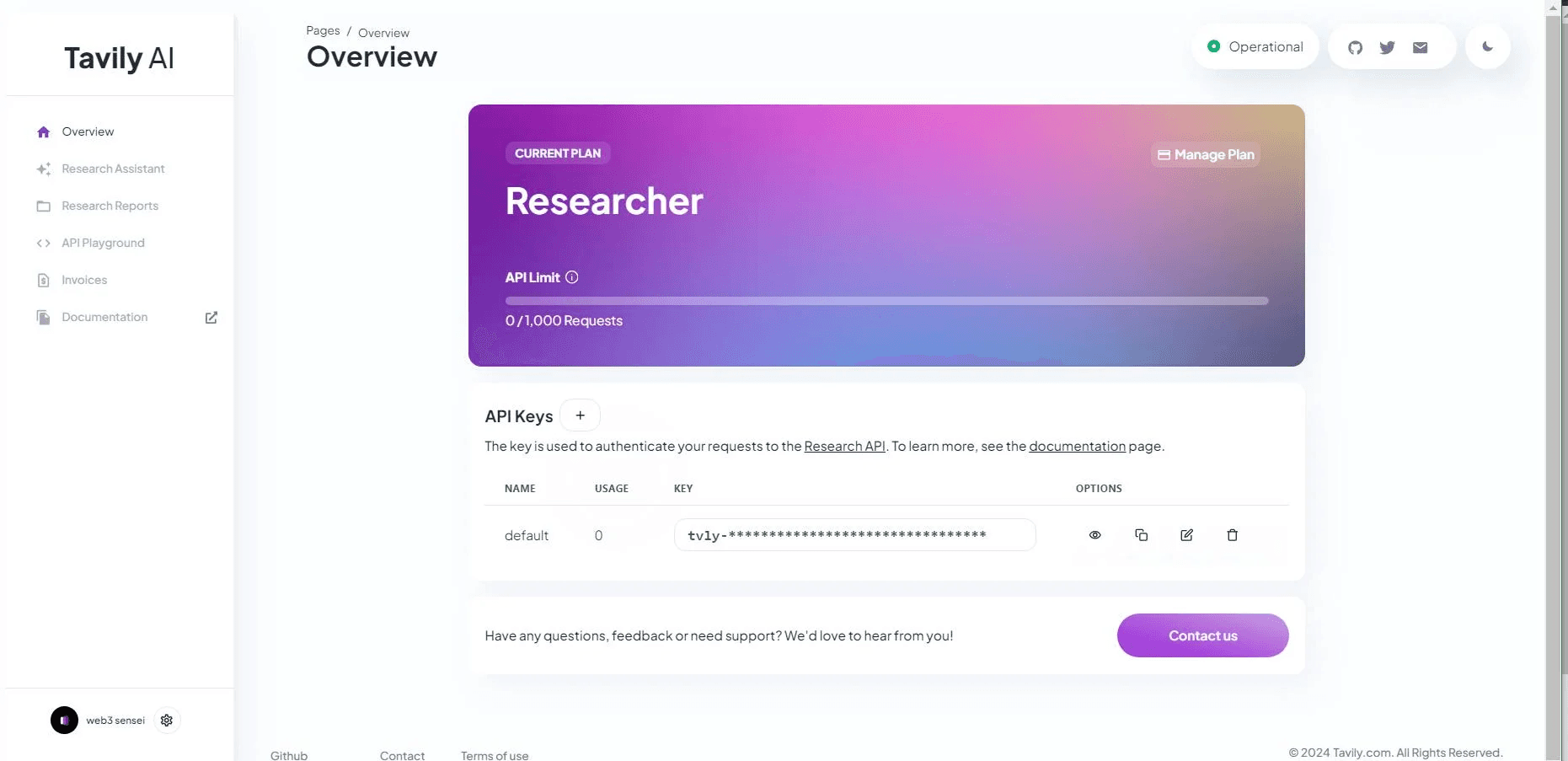
Now, add Tavily integration with Composio.
composio add tavily
Complete the authentication by providing the Tavily API key when prompted on the terminal.
Define Composio tools and instantiate Groq client.
import os
from composio_openai import App, ComposioToolSet
import groq
tool_set = ComposioToolSet()
tools = tool_set.get_tools(apps=[App.TAVILY])
groq_client = groq.Groq(api_key=os.environ.get("GROQ_API_KEY"))
Now, define the system prompt and user prompt.
system_prompt = """You are a helpful assistant.
whenever appropriate, use the Tavily search tool for the latest
information from the internet to provide users with up-to-date information.
Return the URL of the information.
"""
user_prompt = "Who was the gold medalist in Men's 100m sprint in paris olymics, 2024?"
messages=[
    {
        "role": "system",
        "content": system_prompt
    },
    {
        "role": "user",
        "content": user_prompt,
    }
]
Next, define a ChatCompletion request using the prompts, tools, and model.
response = groq_client.chat.completions.create(
    model="llama-3.1-70b-versatile",
    messages=messages,
    tools=tools,
    tool_choice="auto",
    max_tokens=4096
)
response_message = response.choices[0].message
Extract the required information from the response, such as the content, thread ID, and source URL.
response_message = response.choices[0].message
tool_call_id = response_message.tool_calls[0].id
tool_name = response_message.tool_calls[0].function.name
# Execute function calls
response_after_tool_calls = tool_set.handle_tool_calls(response=response)
content = response_after_tool_calls[0]['data']['response_data']['results'][0]['content']
url = response_after_tool_calls[0]['data']['response_data']['results'][0]['url']
Pass it back to the LLM for generating an answer.
messages.append({
                   "tool_call_id": tool_call_id,
                   "role": "tool",
                   "name": tool_name,
                   "content": f"{content}+url:+{url}",
               })
second_response = groq_client.chat.completions.create(
  model="llama-3.1-70b-versatile",
  messages=messages
)
print(second_response.choices[0].message.content)
That’s all; that is how you can leverage Composio tools and Llama 3’s tool-calling ability to create better AI assistants.
Building Agents with LlamaIndex
We saw how to use Llama 3 from Groq for text completion and tool calling and also built a small research agent. However, you can make even more complicated agents with frameworks like LlamaIndex.
LlamaIndex abstracts handling responses from LLMs so that you can build agents faster.
Let’s see an example of how to use LlamaIndex’s FunctionCallingAgents.
Begin by installing Composio’s LlamaIndex plugin and LlamaIndex’s Groq extension.
pip install composio-llamaindex
pip install llama-index-llms-groq
Import libraries and define search tools using Tavily.
import os
from composio_llamaindex import App, ComposioToolSet
from llama_index.core.agent import FunctionCallingAgentWorker
from llama_index.core.llms import ChatMessage
from llama_index.llms.groq import Groq
toolset = ComposioToolSet()
tools = toolset.get_tools(apps=[App.TAVILY])
Create a Groq instance and define a prefix system message.
llm = Groq(model="llama-3.1-70b-versatile", api_key=os.environ.get("GROQ_API_KEY"))
prefix_messages = [
    ChatMessage(
        role="system",
        content=(
            "You are now a search analyst agent; whatever you request, you will try to execute it utilizing your tools."
        ),
    )
]
Finally, define the agent and execute it with human input.
agent = FunctionCallingAgentWorker(
    tools=tools,
    llm=llm,
    prefix_messages=prefix_messages,
    max_function_calls=10,
    allow_parallel_tool_calls=False,
    verbose=True,
).as_agent()
human_input = "write a summary of 60 words on the current update on Trump's Campaign for 2024 elections."
response = agent.chat(
    "Task to perform:" + human_input
)
print("Response:", response)
With this, you have created an internet search agent using Llama 3’s tools calling ability.
Putting everything together.
import os
from composio_llamaindex import App, ComposioToolSet
from llama_index.core.agent import FunctionCallingAgentWorker
from llama_index.core.llms import ChatMessage
from llama_index.llms.groq import Groq
toolset = ComposioToolSet()
tools = toolset.get_tools(apps=[App.TAVILY])
llm = Groq(model="llama-3.1-70b-versatile", api_key=os.environ.get("GROQ_API_KEY"))
prefix_messages = [
    ChatMessage(
        role="system",
        content=(
            "You are now a Search analyst agent, and what ever you are requested, you will try to execute utilizing your toools."
        ),
    )
]
agent = FunctionCallingAgentWorker(
    tools=tools,
    llm=llm,
    prefix_messages=prefix_messages,
    max_function_calls=10,
    allow_parallel_tool_calls=False,
    verbose=True,
).as_agent()
human_input = "write a summary of 60 words on what is the current update on Trump's Campaign for 2024 elections."
response = agent.chat(
    "Task to perform:" + human_input
)
print("Response:", response)
Next Steps
In this article, you learnt the fundamentals of tool-calling and how to implement using Composio tools and Groq’s Llama 3 to build simple agents.
However, with Composio's extensive collection of tools, you can create even more sophisticated agents. Be sure to read our blog post on building a software engineering agent that can automatically write code for you and explore our examples to discover more innovative agents. Discover the effectiveness of Meta Llama 3.2's vision performance.

 Get started