How to connect Apollo to Muse

Connect Muse to Apollo MCP. Bulk enrich profiles for new leads, add contacts to outreach sequence now, and more using natural language, with authentication handled for you.

Apollo logoApollo
Api Key

Apollo is a CRM and lead generation platform that helps businesses discover contacts and manage sales pipelines. Use it to streamline customer outreach and track your deals from one place.

67 Tools

Introduction

Muse is Meta's AI assistant. It can connect to outside tools through custom connectors, which use the Model Context Protocol (MCP).

This guide explains how to connect Apollo to Muse using Composio Connect, which handles OAuth, token refresh, and reliability so you do not have to. You add Composio as a custom connector once, then ask Muse to work with Apollo in plain language.

Also integrate Apollo with

Why use Composio?

  • Cross-app workflows across 1,500+ apps from a single plugin layer.
  • On-demand tool loading so Muse only loads the tools needed for the current task.
  • Programmatic tool calling through a remote workbench for complex, multi-step workflows.
  • Multi-account support so users can connect and switch between multiple accounts for the same app.
  • Shared account access so teams or agents can work through common business accounts and service connections.
  • Managed authentication with OAuth handling, credential storage, and token refresh managed by Composio.
  • Safer credential handling so app credentials stay outside the model context and tool responses.
  • User-level account isolation so actions run against the correct connected account instead of mixing user access.

Connecting Apollo to Muse

You add Composio to Muse once as a custom connector, then connect Apollo from the chat.

1. Ask Muse to connect to Composio

Start a new Muse chat and send this message. Muse builds the connector and shows a button to add your API key.

bash
Create a Custom Connector for the Composio remote MCP server and connect to it:
- Name: Composio
- Transport: remote streamable HTTP
- URL: https://connect.composio.dev/mcp
- Auth: API key sent in the x-consumer-api-key header
Open the secure credentials store so I can enter the API key there, not in this chat. Then list its tools to confirm the connection works.

2. Copy your API key

Open the Muse page in your Composio dashboard and copy your API key. It starts with ck_.

Don't paste it into the chat. It goes in Muse's secure credentials store in the next step.

3. Add your API key in the secure credentials store

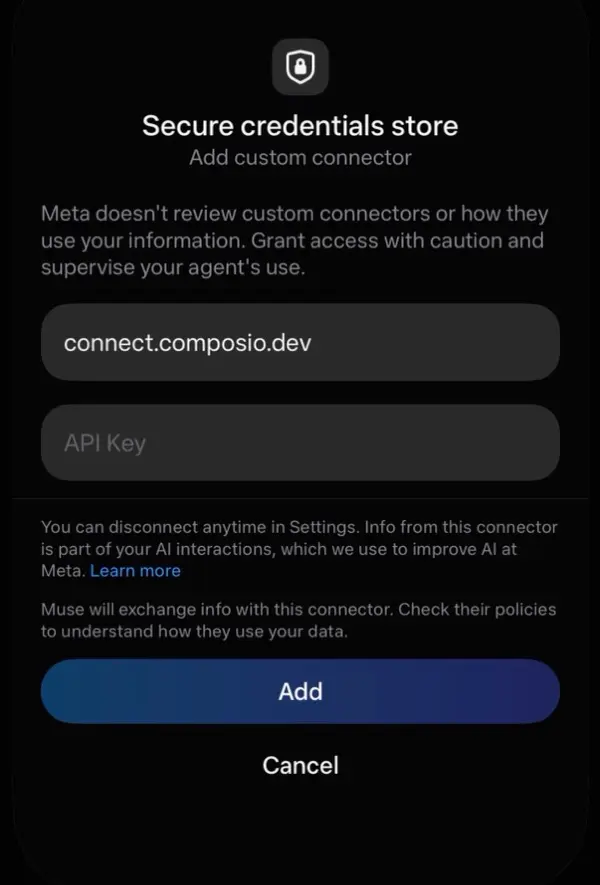
Tap the button Muse shows to open Add custom connector, paste your API key, then tap Add. Muse lists the Composio tools once it connects.

Muse secure credentials store with the connect.composio.dev URL, an API Key field, and the Add button

4. Connect your Apollo account

Back in the chat, ask Muse to connect to Apollo or give it any Apollo task.

For example, ask it to:

  • "Bulk enrich profiles for new leads"
  • "Add contacts to outreach sequence now"
  • "Create a new sales deal for Acme"

It will prompt you to authenticate and authorize access.

That's it. Composio's tools are now available in Muse, and your Apollo account is ready to use.

What is the Apollo MCP server, and what's possible with it?

The Apollo MCP server is an implementation of the Model Context Protocol that connects your AI agent and assistants like Claude, Cursor, etc directly to your Apollo account. It provides structured and secure access to your contacts, organizations, outreach, pipeline, conversations, and analytics, so your agent can find prospects, enrich records, manage sequence participation, update sales stages, and review performance on your behalf.

  • Prospect search and enrichment: Have your agent search for people and enrich person or organization records with data from Apollo.
  • Sequence and outreach management: Let the agent find sequences, add contacts to them, update contact participation status, and review sent outreach emails and engagement activity.
  • Contact and account updates: Direct your agent to update contact stages, account stages, and ownership assignments across your sales records.
  • Pipeline, task, and conversation research: Instruct your agent to retrieve deal details, search sales tasks, and review recorded conversations with transcripts, participants, and related opportunities.
  • Sales insights and company signals: Have your agent query analytics reports, check credit usage, find company news, and review organization job postings.

Way Forward

Now that Apollo is connected, extend your setup by connecting the other apps you already use every day, so Muse can run true cross-app workflows end to end.

  • Connect Calendar to turn threads into scheduled meetings automatically.
  • Connect Slack or Teams to post summaries, approvals, and alerts where your team works.
  • Connect Notion, Linear, Jira, or Asana to convert requests into tickets, tasks, and docs.
  • Connect Drive, Dropbox, or OneDrive to fetch, file, and share attachments without manual steps.

Start with one workflow you do repeatedly, then keep adding apps as you find new handoffs. With everything behind a single connection, Muse can coordinate multiple tools safely and reliably in one conversation.

Troubleshooting

1. Why doesn't Muse show a button to add my API key?

Muse shows the button only when you ask it to open the secure credentials store.

  • Start a new chat.
  • Send the message from step 1 exactly as written.
  • If Muse asks for the key in the chat, do not paste it. Ask Muse to open the secure credentials store.

2. Why does the Composio connection fail after I add my API key?

The key or the connector settings are not correct.

  • Copy the full key from the Composio dashboard. It starts with ck_.
  • Make sure the URL is https://connect.composio.dev/mcp and the header is x-consumer-api-key.
  • Remove the Composio connector in Muse settings, then do steps 1 to 3 again.

3. Why doesn't Muse use the Composio tools for Apollo?

Muse may not pick the Composio connector for the request.

  • Ask Muse to list its Composio tools.
  • Name Composio and Apollo in your request, for example: Use Composio to connect to Apollo.
  • If it still does not work, start a new chat and try again.

4. Why does Muse ask me to connect Apollo again?

Your Apollo connection expired or was removed.

  • Open the link Muse gives you and sign in to Apollo again.
  • Check that the Apollo connection shows as ACTIVE in the Composio dashboard.

5. What do I do if I pasted my API key into the chat?

Treat the key as exposed.

  • Create a new API key in the Composio dashboard and delete the old one.
  • Add the new key in Muse's secure credentials store, not in the chat.
TOOLS

Supported Tools

Every Apollo action and event your agent gets out of the box.

Activate Sequence

Activate an inactive Apollo sequence and begin its scheduled outreach.

Add Contacts to Sequence

Adds contacts to a specified Apollo email sequence and returns the contact details.

Archive Sequence

Archive an Apollo sequence, making it inactive and finishing all enrolled contacts.

Bulk organization enrichment

Enriches data for up to 10 organizations simultaneously by providing a list of their base company domains (e.

Bulk people enrichment

Use to enrich multiple person profiles simultaneously with comprehensive data from Apollo's database.

Bulk update account stage

Bulk updates the stage for specified existing Apollo.

Complete Apollo Task

Permanently mark an Apollo task as completed and return its resulting state.

Create an Apollo account

Creates a new account in Apollo.

Bulk create Apollo accounts

Creates multiple accounts in Apollo.

Bulk create Apollo contacts

Tool to bulk create multiple contacts in Apollo with a single API call.

Create call record in Apollo

Tool to log call records in Apollo from external systems.

Create Apollo contact

Creates a new contact in Apollo.

Create custom field

Creates a new custom field in Apollo.

Create Apollo deal

Creates a new sales opportunity (deal) in Apollo.

Create Email Draft

Create an unsent Apollo outreach draft, or return the existing draft already linked to outreach_task_id.

Create Apollo Sequence

Create an Apollo outreach sequence, optionally including steps and email variants.

Create Apollo Task

Tool to create a single task in Apollo.

Deactivate Sequence

Deactivate an active Apollo sequence.

Export Conversations

Start an asynchronous gzipped JSON conversation export and email a team member when it is ready.

Get Account by ID

Tool to retrieve detailed information about a specific account by its Apollo ID.

Check Apollo API key status

Tool to check whether the provided Apollo API key is valid and accepted by Apollo (health/auth check).

Get Apollo Contact

Retrieves detailed information about a specific contact by its ID.

Get Conversation

Retrieve full Apollo conversation details, including transcript, participants, recordings, and opportunities.

Get Conversation Export

Retrieve the download redirect URL for a previously started Apollo conversation export.

Get Apollo deal

Retrieves information about a specific deal by its ID.

Get Email Activities

Retrieves content, open and click activity, and recipient details for one Apollo sequence email.

Get Email Content

Retrieve content for up to 10 sent team outreach emails.

Get Labels

Retrieves all labels from Apollo.

Get opportunity stages

Retrieves all configured opportunity (deal) stages from the Apollo.

Get Organization by ID

Retrieves complete information about a specific organization by its Apollo ID.

Get Organization Job Postings

Retrieves paginated job postings for a specified organization by its ID, optionally filtering by domain; ensure `organization_id` is a valid identifier.

Get Apollo Task

Retrieves the full details of one Apollo task by ID, including associated records and type-specific data when present.

Get typed custom fields

Retrieves all typed custom field definitions available in the Apollo.

List Apollo account stages

Retrieves the IDs for all available account stages in your team's Apollo account.

List apollo contact stages

Retrieves all available contact stages from an Apollo account, including their unique IDs and names.

List Apollo deals

Retrieves a list of deals from Apollo, using Apollo's default sort order if 'sort_by_field' is omitted.

List email accounts

Retrieves all email accounts and their details for the authenticated user; takes no parameters.

List Fields

Retrieves all field definitions from Apollo.

List Apollo Notes

List notes associated with Apollo records.

List Apollo Users

Retrieves a list of all users (teammates) associated with the Apollo account, supporting pagination via `page` and `per_page` parameters.

Enrich organization data

Fetches comprehensive organization enrichment data from Apollo.

Search organizations in Apollo

Searches Apollo's database for organizations using various filters; consumes credits on every call (unavailable on free plans) — avoid re-running identical queries and surface quota errors rather than retrying.

Enrich person with Apollo

Enriches and retrieves information for a person from Apollo.

Apollo people search

Searches Apollo's contact database for people using various filters; results capped at 50,000 records and does not enrich contact data.

Query Analytics Report

Query Apollo analytics metrics, dimensions, filters, and date ranges.

Search Apollo Accounts

Searches for accounts within your existing Apollo.

Search for Calls

Searches for call records in Apollo.

Search Apollo contacts

Searches Apollo contacts using keywords, stage IDs (from 'List Contact Stages' action), or sorting (max 50,000 records; `sort_ascending` requires `sort_by_field`).

Search Apollo Conversations

Search Apollo video meetings and dialer calls using record, participant, date, scorecard, sorting, and visibility filters.

Search news articles

Tool to search for news articles about companies in Apollo's database.

Search outreach emails

Tool to search for outreach emails sent through Apollo sequences.

Search sequences

Searches for sequences (e.

Search tasks

Searches for tasks in Apollo.

Send Email Now

Queue an Apollo email for external sending; success means queued, not delivered.

Update an Apollo account

Updates specified attributes of an existing account in Apollo.

Update account ownership

Updates the ownership of multiple Apollo accounts to a specified user.

Update Apollo call record

Tool to update an existing call record in Apollo.

Update Apollo contact details

Tool to update an existing contact's information in Apollo.

Update contact ownership

Updates the ownership of specified Apollo contacts to a given Apollo user, who must be part of the same team.

Bulk update Apollo contacts

Tool to bulk update multiple Apollo contacts with a single API call.

Update contact stage

Updates the stage for one or more existing contacts in Apollo.

Update contact status in sequence

Updates a contact's status within a designated Apollo sequence, but cannot set the status to 'active'.

Update Apollo deal

Updates specified fields of an existing Apollo.

Update Sequence

Update an Apollo sequence's settings, ownership, sharing, steps, and touches.

Update Apollo Task

Update editable details of an existing Apollo task.

View API Usage Stats

Fetches Apollo API usage statistics and rate limits for the connected team.

View Credit Usage Stats

Read team balances by credit type for Apollo's current billing cycle.

FAQ

Frequently asked questions

Yes. Muse supports custom connectors that use the Model Context Protocol (MCP). Composio connects as one custom connector over remote streamable HTTP at https://connect.composio.dev/mcp, and gives Muse access to Apollo and 1,500+ other apps.

Copy it from the Composio dashboard. It starts with ck_. Enter it only in Muse's secure credentials store, never in the chat.

Yes. Composio supports multiple connected accounts for the same app. Give each Apollo connection a name, such as work or personal, and tell Muse which one to use.

Tokens, keys, and configuration are encrypted at rest and in transit. Your Composio API key stays in Muse's secure credentials store, not in the chat or the model context. Composio is SOC 2 Type 2 compliant.

Start with Apollo.It takes 30 seconds.

Managed auth, hosted MCP servers, and every Apollo tool your agent needs.Free to start.

Start building