Whatsapp CLI for AI Agents

Use Composio Universal CLI with Whatsapp. Send contact card to new lead, get business profile details for support, and more using natural language, with authentication handled for you.

Whatsapp logoWhatsapp
Oauth2Api Key

WhatsApp is a business messaging platform for secure, automated customer communication. It streamlines chat workflows and customer outreach using the WhatsApp Business API.

58 Tools1 Triggers

Introduction

CLIs are eating MCPs. The industry is converging on the very same idea. MCPs for all their merit can be token hungry, slow, and unreliable for complex tool chaining. However, coding agents have become incredibly good at working with CLIs, and in fact they are far more comfortable working with CLI tools than MCP.

With Composio's Universal CLI, your coding agents can talk to over 1500+ SaaS applications. With Whatsapp, agents can send contact card to new lead, get business profile details for support, list all approved message templates, and more — all without worrying about authentication.

This guide walks you through Composio Universal CLI and explains how you can connect it with coding agents like Claude Code, Codex, OpenCode, etc, for end-to-end Whatsapp automation.

Also integrate Whatsapp with

What is Universal CLI and why use it?

The idea behind building the universal CLI is to give agents a single command interface to interact with all your external applications. Here's what you'll get with it:

  • Agent-friendly: Coding agents like Claude Code, Codex, and OpenCode can use CLI tools natively — no MCP setup required.
  • Authentication handled: Connect once via OAuth or API Key, and all CLI commands work with your credentials automatically.
  • Tool discovery: Search, inspect, and execute 20,000+ tools across 1500+ apps from one interface.
  • Trigger support: Use triggers to listen for events across your apps, powered by real-time webhooks or polling under the hood.
  • Type generation: Generate typed schemas for autocomplete and type safety in your projects.

Prerequisites

Install the Composio CLI, authenticate, and initialize your project:

bash
# Install the Composio CLI
curl -fsSL https://composio.dev/install | bash

# Authenticate with Composio
composio login

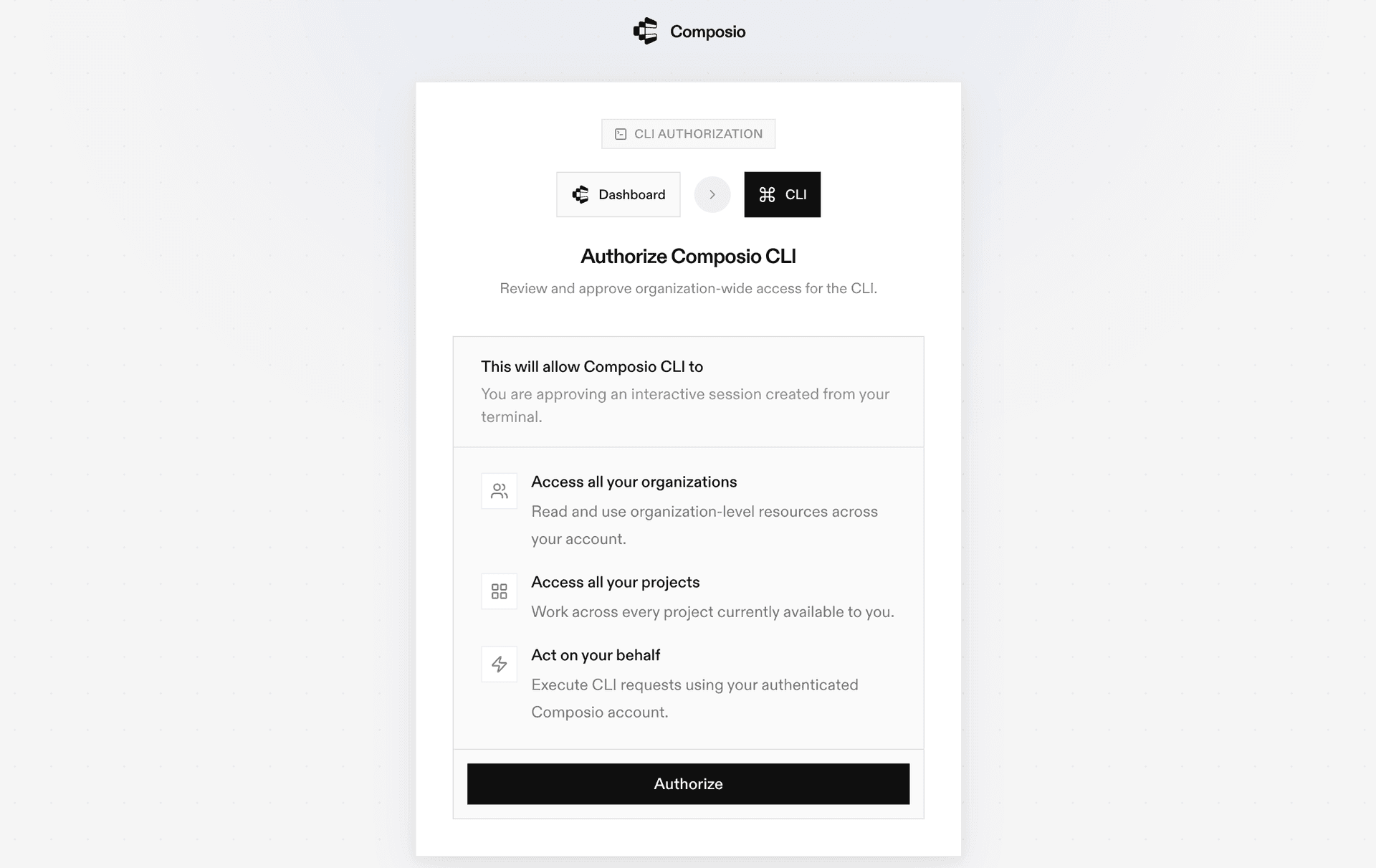
During login you'll be redirected to sign in page, finish the complete flow and you're all set.

Composio CLI authentication flow

Connecting Whatsapp to Coding Agents via Universal CLI

Once it is installed, it's essentially done. Claude Code, Codex, OpenCode, OpenClaw, or any other agent will be able to access the CLI. A few steps to give agents access to your apps.

  1. Launch your Coding Agent — Claude Code, Codex, OpenCode, anything you prefer.
  2. Prompt it to "Authenticate with Whatsapp"
  3. Complete the authentication and authorization flow and your Whatsapp integration is all set.
  4. Start asking anything you want.

Universal CLI Commands for Whatsapp

You can also manually execute CLI commands to interact with your Whatsapp.

Connect your Whatsapp account

Link your Whatsapp account and verify the connection:

bash
# Connect your Whatsapp account (opens OAuth flow)
composio connected-accounts link whatsapp

# Verify the connection
composio connected-accounts list --toolkits whatsapp

Discover Whatsapp tools

Search and inspect available Whatsapp tools:

bash
# List all available Whatsapp tools
composio tools list --toolkit whatsapp

# Search for Whatsapp tools by action
composio tools search "whatsapp"

# Inspect a tool's input schema
composio tools info WHATSAPP_SEND_CONTACTS

Common Whatsapp Actions

Send contacts — Send contacts WhatsApp number

bash
composio tools execute WHATSAPP_SEND_CONTACTS \
  --contacts '[{"org":{"title":"Engineer","company":"Acme Inc"},"name":{"last_name":"Smith","first_name":"Jane","formatted_name":"Jane Smith"},"emails":[{"type":"WORK","email":"jane@example.com"}],"phones":[{"type":"CELL","phone":"+14155551234"}]}]' \
  --to_number "<string>" \
  --phone_number_id "<string>"

Send interactive buttons — Send an interactive button message with up to 3 reply buttons to a WhatsApp user

bash
composio tools execute WHATSAPP_SEND_INTERACTIVE_BUTTONS \
  --buttons "<array>" \
  --body_text "<string>" \
  --to_number "<string>" \
  --phone_number_id "<string>"

Send interactive list — Send an interactive list message to a WhatsApp number

bash
composio tools execute WHATSAPP_SEND_INTERACTIVE_LIST \
  --body_text "<string>" \
  --to_number "<string>" \
  --button_text "<string>" \
  --phone_number_id "<string>"

Send location — Send a location message with coordinates, name, and address to a WhatsApp user

bash
composio tools execute WHATSAPP_SEND_LOCATION \
  --latitude "<string>" \
  --longitude "<string>" \
  --to_number "<string>" \
  --phone_number_id "<string>"

Send media — Send a media message to a WhatsApp number

bash
composio tools execute WHATSAPP_SEND_MEDIA \
  --link "<string>" \
  --to_number "<string>" \
  --media_type "<string>" \
  --phone_number_id "<string>"

Send media by — Send media using a media ID from previously uploaded media

bash
composio tools execute WHATSAPP_SEND_MEDIA_BY_ID \
  --media_id "<string>" \
  --to_number "<string>" \
  --media_type "<string>" \
  --phone_number_id "<string>"

Send message — Send a text message to a WhatsApp user

bash
composio tools execute WHATSAPP_SEND_MESSAGE \
  --text "<string>" \
  --to_number "<string>" \
  --phone_number_id "<string>"

Send template message — Send a template message to a WhatsApp number

bash
composio tools execute WHATSAPP_SEND_TEMPLATE_MESSAGE \
  --to_number "<string>" \
  --template_name "<string>" \
  --phone_number_id "<string>"

Set up Whatsapp Triggers

Listen for events in real time using triggers:

Message Status Updated — Triggers when a WhatsApp message status changes

bash
# Find your connected account ID
composio connected-accounts list --toolkits whatsapp

# Create a trigger
composio triggers create WHATSAPP_MESSAGE_STATUS_UPDATED_TRIGGER \
  --connected-account-id <your-connected-account-id> \
  --trigger-config '{
  "interval": 2,
  "max_results": 50,
  "phone_number_id": "<string>"
}'

# Listen for trigger events in real time
composio triggers listen --toolkits whatsapp --table

Generate Type Definitions

Generate typed schemas for Whatsapp tools to get autocomplete and type safety in your project:

bash
# Auto-detect language
composio generate --toolkits whatsapp

# TypeScript
composio ts generate --toolkits whatsapp

# Python
composio py generate --toolkits whatsapp

Tips & Tricks

  • Always inspect a tool's input schema before executing: composio tools info <TOOL_NAME>
  • Pipe output with jq for better readability: composio tools execute TOOL_NAME -d '{}' | jq
  • Set COMPOSIO_API_KEY as an environment variable for CI/CD pipelines
  • Use composio dev logs tools to inspect execution logs and debug issues

Next Steps

  • Try asking your coding agent to perform various Whatsapp operations
  • Explore cross-app workflows by connecting more toolkits
  • Set up triggers for real-time automation
  • Use composio generate for typed schemas in your projects
TOOLS & TRIGGERS

Supported Tools and Triggers

Every Whatsapp action and event your agent gets out of the box.

Block WhatsApp Users

Block one or more WhatsApp users to prevent them from sending messages to your business phone number.

Configure WhatsApp Conversational Automation

Configure conversational automation settings for a WhatsApp Business phone number.

Create WhatsApp Flow

Create a new WhatsApp Flow for the WhatsApp Business Account.

Create WhatsApp Max Price Agreement

Create a max price agreement for WhatsApp marketing messages pricing.

Create message template

Create a new message template for the WhatsApp Business Account.

Create QR Code

Create a new QR code with a prefilled message for a WhatsApp Business phone number.

Create upload session for WhatsApp

Create a resumable upload session for large file uploads to WhatsApp.

Delete WhatsApp Media

Delete a WhatsApp media file previously uploaded via the Media API.

Delete message template

Delete a message template from the WhatsApp Business Account by name.

Delete QR Code

Delete a specific QR code from a WhatsApp Business phone number.

Deregister WhatsApp Business Phone Number

Deregister a WhatsApp Business phone number from the Cloud API.

Get WhatsApp Business Account Activities

Retrieve activity history for a WhatsApp Business Account.

Get WhatsApp Business Account Details

Retrieve comprehensive details about a WhatsApp Business Account (WABA).

Get WhatsApp Business Compliance Info

Retrieve comprehensive business compliance information for a WhatsApp Business phone number.

Get Business Encryption

Retrieve the WhatsApp Business public key and its signature verification status.

Get business profile

Get the business profile information for a WhatsApp Business phone number.

Get client WhatsApp Business Accounts

Retrieve WhatsApp Business Accounts shared with or managed by a business portfolio.

Get WhatsApp Commerce Settings

Get commerce settings for a WhatsApp Business phone number.

Get Flow Assets

List assets associated with a WhatsApp Flow.

Get Join Requests

Get all pending join requests for a WhatsApp group.

Get media info

Get metadata and download URL for uploaded WhatsApp media.

Get WhatsApp Message History

Retrieve message history for a WhatsApp Business phone number.

Get message templates

Get all message templates for the WhatsApp Business Account.

Get owned WhatsApp Business Accounts

Retrieve WhatsApp Business Accounts owned by a business portfolio.

Get phone number

Retrieve detailed information about a specific WhatsApp Business phone number.

Get phone numbers

Retrieve all phone numbers registered to your WhatsApp Business Account.

Get WhatsApp Schedules

Retrieve campaign schedules associated with a WhatsApp Business Account.

Get WhatsApp Cloud API Settings

Get Cloud API settings for a WhatsApp Business phone number.

Get Subscribed Apps

Get all applications currently subscribed to webhooks for a WhatsApp Business Account.

Get message template library

Browse the pre-built message template library for WhatsApp Business Account.

Get template status

Get the status and details of a specific message template.

List WhatsApp Flows

List all WhatsApp Flows associated with the WhatsApp Business Account.

List WhatsApp Groups

List all WhatsApp groups associated with a business phone number.

List qr codes

Get a list of all QR codes for a WhatsApp Business phone number.

List WhatsApp Solutions

Retrieve a paginated list of Multi-Partner Solutions for a WhatsApp Business Account.

Publish WhatsApp Flow

Publish a WhatsApp Flow to make it available for use.

Register WhatsApp Business Phone Number

Register a WhatsApp Business phone number for use with WhatsApp Cloud API.

Remove Assigned User from WhatsApp Business Account

Remove a user's access from the WhatsApp Business Account.

Send contacts

Send contacts WhatsApp number.

Send interactive buttons

Send an interactive button message with up to 3 reply buttons to a WhatsApp user.

Send interactive list

Send an interactive list message to a WhatsApp number.

Send location

Send a location message with coordinates, name, and address to a WhatsApp user.

Send media

Send a media message to a WhatsApp number.

Send media by

Send media using a media ID from previously uploaded media.

Send message

Send a text message to a WhatsApp user.

Send template message

Send a template message to a WhatsApp number.

Set WhatsApp Two-Step Verification PIN

Set or reset the two-step verification PIN for a WhatsApp Business phone number.

Subscribe to WABA Webhooks

Subscribe your application to receive webhook notifications for a WhatsApp Business Account (WABA).

Unsubscribe from WABA Webhooks

Unsubscribe your application from webhook events for a WhatsApp Business Account (WABA).

Update WhatsApp Flow Metadata

Update metadata for a WhatsApp Flow including its name, categories, and endpoint URI.

Update WhatsApp Business Profile

Update WhatsApp Business Profile information including business details, contact information, and profile settings.

Update WhatsApp commerce settings

Set or update commerce settings for a WhatsApp Business phone number.

Update Flow JSON

Update the Flow JSON configuration for a WhatsApp Flow.

Update WhatsApp Cloud API Settings

Update Cloud API settings for a WhatsApp Business phone number.

Upload media

Upload media files (images, videos, audio, documents, stickers) to WhatsApp servers.

Upsert message template

Create or update a message template for the WhatsApp Business Account.

Verify Phone Number OTP Code

Verify the OTP code for a pre-verified phone number.

Who Am I

Return the identity (name) of the connected WhatsApp (Meta) account.

FAQ

Frequently asked questions

The Composio Universal CLI is a single command-line interface that lets coding agents and developers interact with 1500+ SaaS applications. It handles authentication, tool discovery, action execution, and trigger setup — all from the terminal, without needing to configure MCP servers.

Any coding agent that can run shell commands works with the Composio CLI — including Claude Code, Codex, OpenCode, OpenClaw, and others. Once the CLI is installed, agents automatically discover and use the composio commands to interact with Whatsapp and other connected apps.

MCP servers require configuration and can be token-heavy for complex workflows. The CLI gives agents a direct, lightweight interface — no server setup needed. Agents simply call composio commands like any other shell tool. It's faster to set up, more reliable for multi-step tool chaining, and works natively with how coding agents already operate.

All sensitive data such as tokens, keys, and configuration is fully encrypted at rest and in transit. Composio is SOC 2 Type 2 compliant and follows strict security practices so your Whatsapp data and credentials are handled as safely as possible. You can also bring your own OAuth credentials for full control.

Start with Whatsapp.It takes 30 seconds.

Managed auth, hosted MCP servers, and every Whatsapp tool your agent needs.Free to start.

Start building